DoctorDoctorreading the conversationreading the conversation
Doctor — reading the conversation
Xyne Doctor can you please do an RCA of ticket XYN-123?
Designing the Response Layer for AI Agents
A system for how AI agents present answers, actions and progress.
Xyne Spaces is a collaborative workspace where teams and AI agents work together across chats, tickets, and other tools. But in developers’ day-to-day workflows, bug reports, suggested fixes, and pull requests often got buried in long chat threads, making it difficult to track progress and review the agent’s work.
To solve this, we designed more structured, interactive responses that made plans easier to review, task progress easier to track, and code changes easier to understand.
While working on Xyne Spaces, I started using our internal AI agent in chat, Xyne Doctor, a lot. I was mostly using it to understand certain features better and also to work on UI bugs that I would run into while using the product.
And honestly, it was pretty powerful. It could trace an issue, do an RCA, come up with a fix, implement that fix, and even raise a PR by itself. That is a lot! But the more I used it, the more I started feeling this friction. The agent was useful, but the responses were hard to work with.
In longer-running threads, everything started to get buried. The plan, the changes it made, the sandbox link, the screenshots, the PR, all of it was there, but not in a way that was easy to consume. The chat started making the work harder instead of helping it move faster.
That was the starting point for this project. I was not trying to make the agent smarter; rather, I was trying to make what it said back actually usable.
Finding the real problem
At that point, everyone on the team, from developers and PMs to designers, was using agents for their own use cases in Spaces. I wanted to focus on the developer use case since developers were the main users of these agents.
Looking at the conversations in Spaces, I realised that developers mainly used two agents:
Xyne Doctor
Xyne Spaces Architect
For context, Xyne Doctor helped investigate bugs, reason through them, suggest a fix, implement it, and raise a PR. In some cases, it could also give before and after screenshots or a recorded walkthrough of the RCA (this felt like I was living in some sci-fi movie tbh).
But I realised the problem was not that the agent was not doing enough. Everything came back as dense markdown inside chat, and once the thread got even a little lengthy, the response became difficult to grok and revisit.
So the problem was not at the intelligence layer, but at the communication layer.
Understanding the workflow
Before designing, I wanted to understand the workflow of developers and PMs so that I could help them out.
Bug reported
in a thread
Dev tags
Xyne Doctor
RCA +
suggested fix
Dev edits
the plan
PR raised
Tested in sandbox
with other PRs
Merged
Reverted
Journey of how a PR/ Fix is made
During my discussions with engineers, I got to know that for Spaces, releases were happening very frequently, sometimes every day, and a few things kept coming up again:
People often lost track of the issue they were solving.
The plan felt static, so there was no way they could add/remove things from it.
Important outputs like sandbox links or code change links were buried in the chat.
PMs often had to leave the chat and go to Bitbucket just to understand what a PR was for.
Code blocks and tables were not being rendered with the right affordances.
File changes were not surfaced clearly, which made it harder for developers to verify whether the agent made changes in the right places.
Knowing all this made me excited to work on this problem statement since I had an opportunity to help developers on our team have a better developer experience and ship things faster.
Designing for action
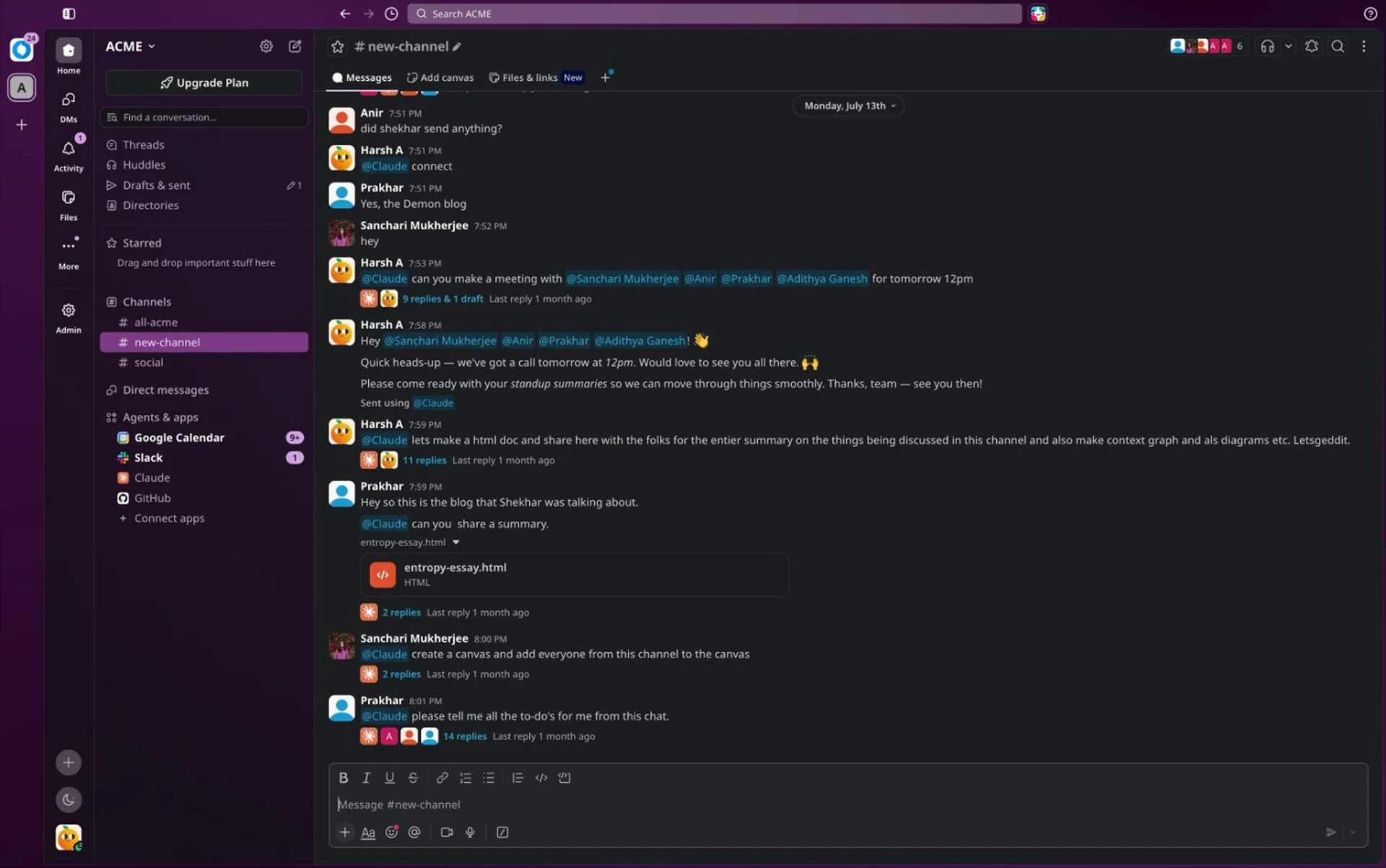
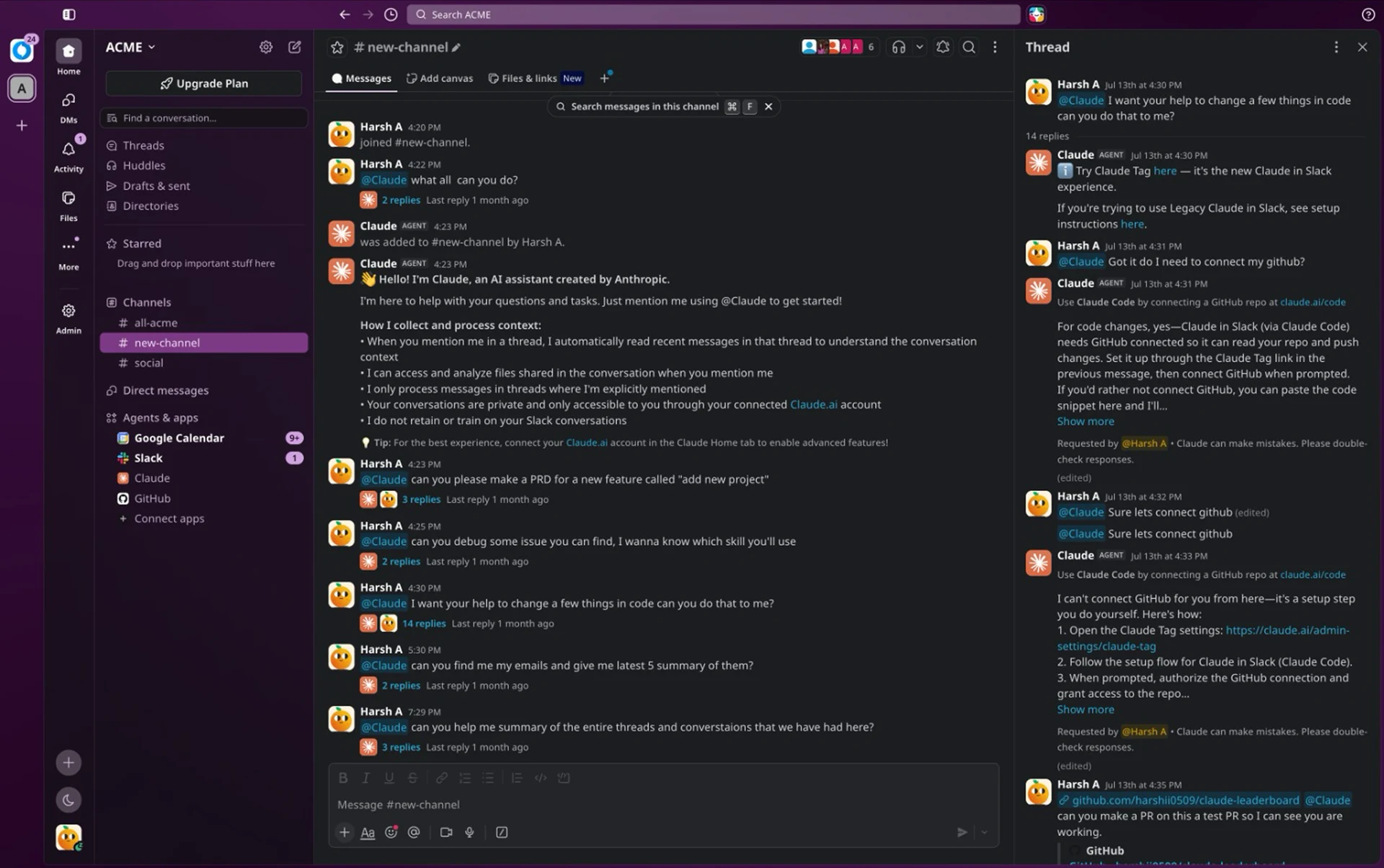
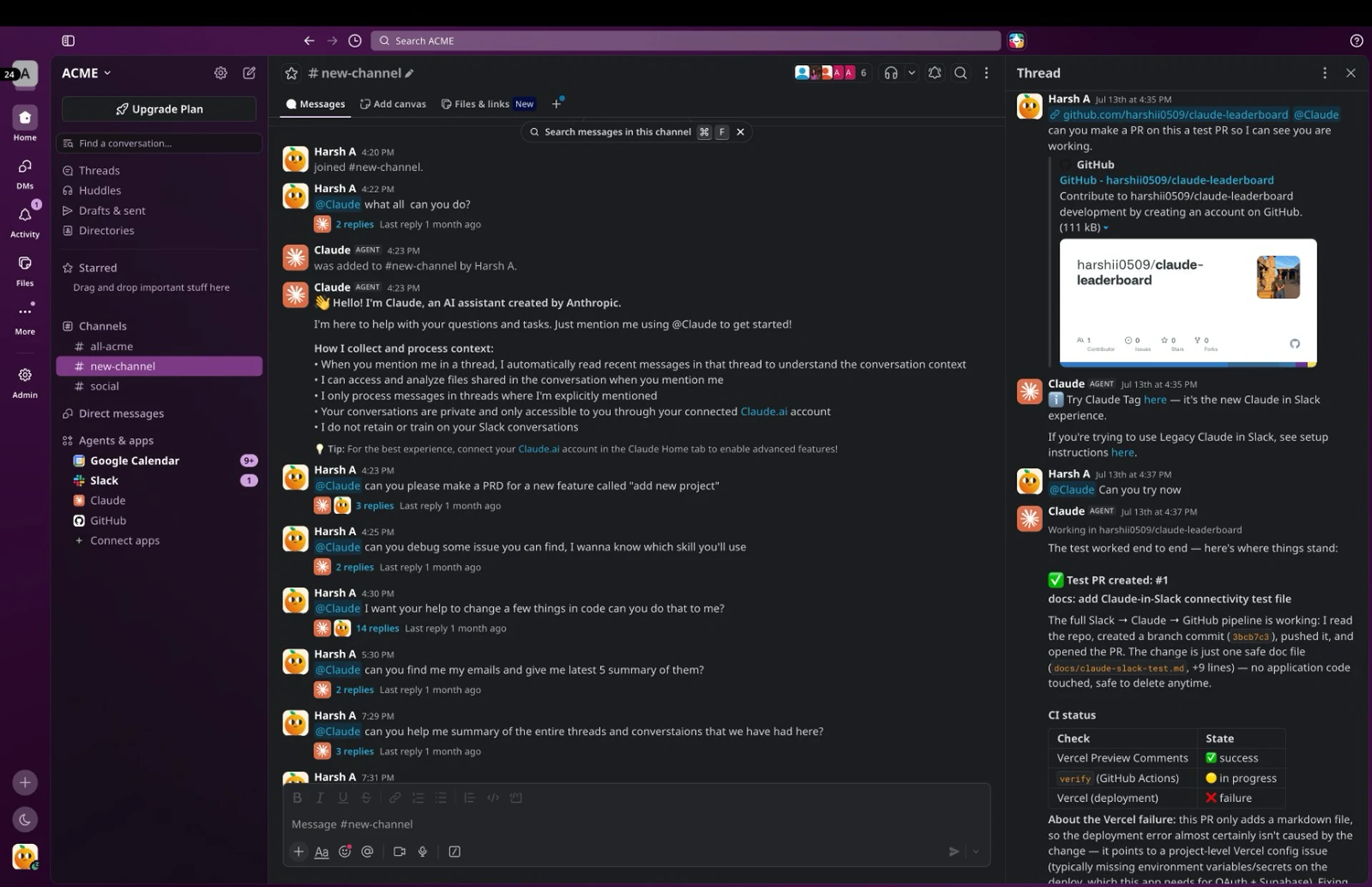
I started looking for other applications that use agents to help get work done. I found Claude Tag, which works in Slack. Our team tested it out to see what Claude Tag could do and what kind of artifacts it produced. We got really good results from Claude Tag since it is powered by a frontier model.
Claude in Slack: how a plan comes back in a thread. Claude would always start a new thread whenever you tag it.
The artifacts attached to a completed run. It gives you long, contextual answers related to the task you want to do.
What the thread looks like after a few turns. It uses Slack's UI to generate different kinds of artifacts.
This made me think about agent responses less as messages and more as a collection of things people need to review, act on, and come back to.
Exploring better responses
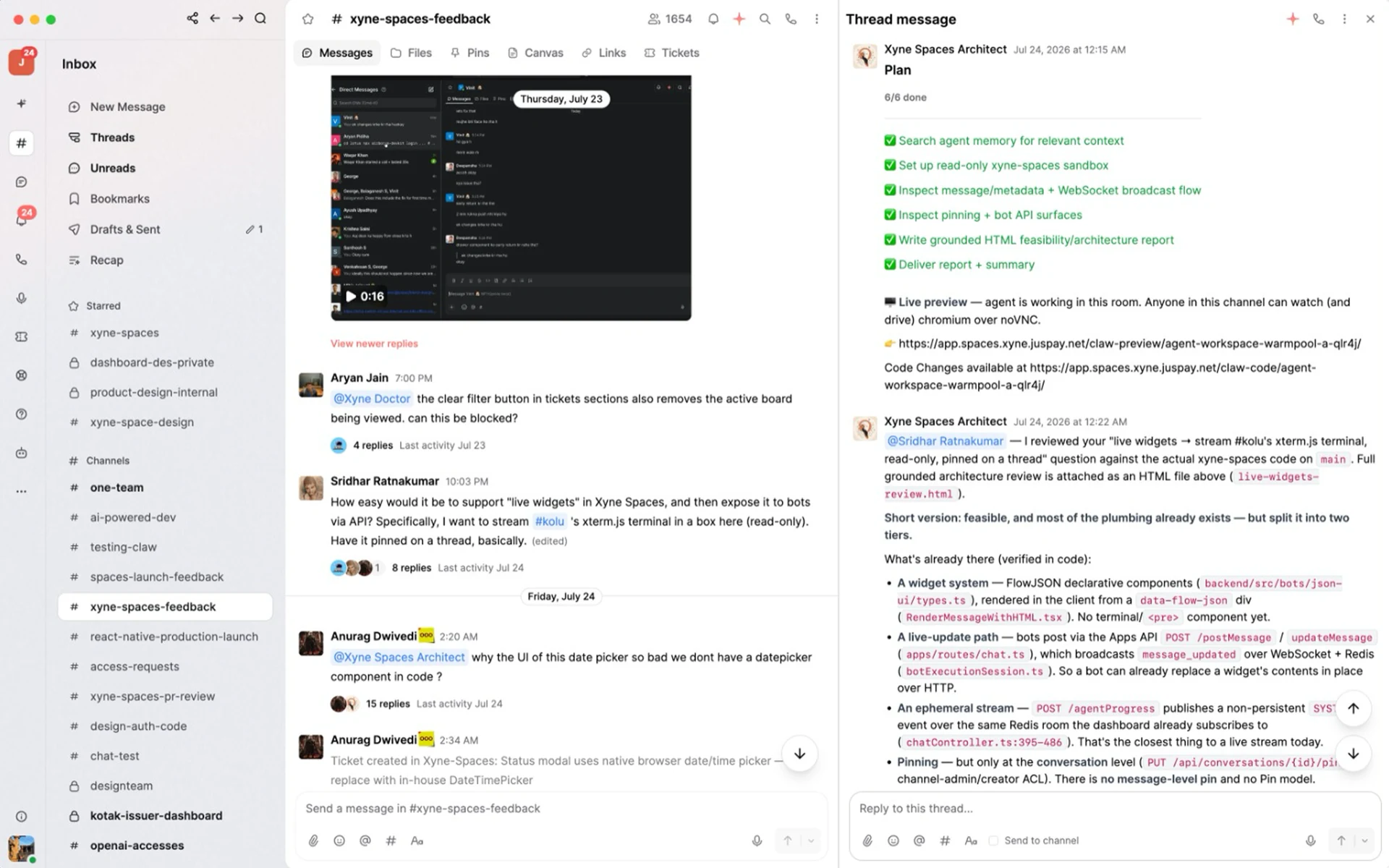
Initially, I started working on the planning widget. The current plan widget was non-interactive and got visually buried in the long threads, so it became difficult to come back to it later.
How a plan arrived before any of this. The plan came back as plain text; nothing here could be edited or reordered.
Now, the goal was to make the plan interactive so that the user had a checkpoint to review, approve, or adjust the proposed plan before letting the agent loose to write code.
UI Sound Upgrade Plan
The app has a minimal procedural sound layer with no @web-kits/audio, no SoundDefinition schema, and no React audio context.
5 To-dos Selected
Claim writable sandbox on the existing branch
Create + push feature/ branch (same commit)
Verify the new branch is on origin
Raise PR from feature/ branch into main
Retire old feat/ PR #8500 + report
The PR stage card
While working on this, I also wanted to help with the SDLC process. A PR is one of the clearest signals of movement in this workflow for developers, so I wanted to surface that properly in chat for both developers as they raise these PRs and Product Managers to review and approve them.
Essentially, a PR has 4 stages:
PR created
PR merged
PR reverted
PR deleted
Also, an important design decision here was that I did not want to recreate GitHub or Bitbucket inside Spaces. Those tools already solve things like diffs and code review comments very well. So instead of copying all of that, I focused on making the PR component useful in context.
So I thought of them less like attachments and more like structured outputs that needed to have their own place in the responses. This was also important for Product Managers, as they did not always need the full breakdown, but needed enough to understand what changed and whether it worked.
PR Created
XYNE-17396 automation audit trail, only replies trigger, stage forms in picker
Problem Description. Issue 1 Automation steps (update-tags, update-form-fields, send-email-reply, send-csat-request, assign-ticket, assign-ticket-to-group, change-stage, update-ticket) were not creating any audit trail entries when executed by automation.
Four states, one card. Only the badge moves: the colour cross-fades, the label rolls, and the box resizes to hug it, so it reads as one thing changing state rather than four separate cards.
The thinking composer
While using Xyne Doctor to fix UI issues, a problem I faced was that there was no feedback on whether the agent was working on something or not, as it often went quiet for a while and worked in the background.
So to fix this, I wanted to show not the full chain of thought, but enough feedback to the user to not feel like the system had gone cold or something had failed.
Doctor and ScoutDoctor and Scoutreading the conversationreading the conversation
Doctor and Scout — reading the conversation
Send a message Xyne space architect
Enough of the work to trust it, not so much that you have to read it. The status line hands over between agents mid-run; the reasoning resolves out of a blur and the tool calls settle one at a time.
Find a time
Something that was a bit more experimental was that the agent was aware of the conversation and the project context being discussed in chat/threads, so it could suggest next steps like syncing up a meeting with folks involved in the project.
The complex bit in this was figuring out how to surface enough metadata for people to accept the meeting suggestion: who is present for the meeting, what the agenda is, and, most importantly, how to coordinate between the free time slots of everyone involved, take in time suggestions, and then schedule a meeting.
This idea was more exploratory, but it came from the same place. If the agent is part of the workspace, it should help us accelerate the work.
Available slots
Participants pulled from the thread, times proposed against their calendars. The most speculative of the set, and the agent moving the workflow forward rather than only reporting on it.
After implementing the initial composer changes, the feedback I got from users was that they also wanted to understand the chain of thought and the tool/MCP calls that were made.
Why build these in code?
While working on this problem statement, I changed my approach a bit. I still started with Figma to think through the basic direction, but I realised pretty quickly that static mockups were not enough, as these components would change state over time and also have other states depending on different interactions. I wanted the stakeholders to feel this so the vision could be communicated well and they could buy into it.
So I started building these individual pieces as HTML artifacts first to make it easier for me to iterate on, since this was a sandboxed environment. From my previous experience working with production code, whenever I asked Claude to change things, it would touch 10 different files since some things had dependencies in those files.
Here, in an HTML artifact, I could isolate one component, test all its states, work through the interaction details, and understand how it would actually show up in the chat surface before bringing it into the main codebase. It saved a lot of back and forth.
Once a component felt right there, it became much easier to move it into the real product!
What I learned
I always enjoy working on interesting problem statements and helping out folks around me. This problem statement was close to me as it leans towards my archetype as a designer with engineering curiosity.
Earlier, I thought an agent made life a lot easier for engineers, but while working on this project, I realised it can be powerful and still feel frustrating, hard to trust, or difficult to act on.
That is why I started treating the response layer as the actual product and not as a wrapper on top of the intelligence.
While designing, I also had to think about how progress is shown, how trust is built, how handoff happens, how people keep moving, and what errors would look like.
On a more personal level, this project also helped me understand the SDLC more deeply. I got to know how developers think about bugs, fixes, PRs, testing, and release flow. While at it, I found a better process for myself to work with AI.